VitriolUsurper
Skilled Gamer





Hello, this is my modded starter save for Hollow Knight Silksong.
These saves can be imported to the PS5 version.
Silksong has Save Wizard support now!! My saves were released before Save Wizard support.
Make sure to delete/upload all your Silksong saves first.
Tested working on PS5 with the PS4 version and PS5, also tested on other accounts.
--------------------------------------------------------------------------------------------
How to use these saves:
How Speedrun works:
When you load the save, you will see that the time is at -0m.
It then reset to -58m, after reaching -0m it will reset back to -58m.
This save is set to -1000 hours. You have 1000 hours to speedrun the game.
After 1000 hours, the save will get to 0 then count up normally.
--------------------------------------------------------------------------------------------
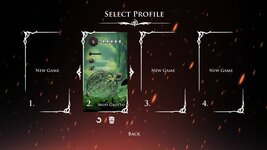
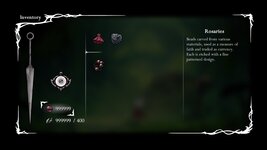
This save has Shell Shards and Rosaries set to 999,999.
The save is in slot 2.
No trophies pop when loading. All trophies can be earned with the save.
ADDED SPEENRUN SAVE.
 --------------------------------------------------------------------------------------------
This save has Shell Shards and Rosaries set to 999,999.
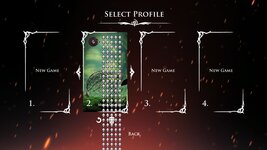
This save also has added GOD MODE. When loading the save, it does lag for 2-3 seconds.
The save is in slot 2.
No trophies pop when loading. All trophies can be earned with the save.
ADDED SPEENRUN SAVE.
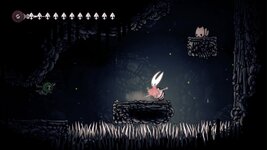 --YOU NEED TO GET A ITEM CALLED DRUID'S EYE. IF YOU DON'T, YOU WILL BE SOFTLOCKED. READ BELOW!--
--------------------------------------------------------------------------------------------
Looks like the save works in other regions even though its a US save.
--------------------------------------------------------------------------------------------
FIXES FOR SAVES NOT WORKING/SAYING CORRUPTED:
These saves can be imported to the PS5 version.
Silksong has Save Wizard support now!! My saves were released before Save Wizard support.
Make sure to delete/upload all your Silksong saves first.
Tested working on PS5 with the PS4 version and PS5, also tested on other accounts.
--------------------------------------------------------------------------------------------
How to use these saves:
- Load into Silksong then get to the main menu, after that close the game.
- Now go to saved data on your console and copy the Silksong save called "Saved Data" to your usb/flash drive.
- Resign the two save files you downloaded.
- Copy all three save to your console.
How Speedrun works:
When you load the save, you will see that the time is at -0m.
It then reset to -58m, after reaching -0m it will reset back to -58m.
This save is set to -1000 hours. You have 1000 hours to speedrun the game.
After 1000 hours, the save will get to 0 then count up normally.
--------------------------------------------------------------------------------------------
This save has Shell Shards and Rosaries set to 999,999.
The save is in slot 2.
No trophies pop when loading. All trophies can be earned with the save.
ADDED SPEENRUN SAVE.
To see this hidden content, you must react with one of the following reactions :  Like, Love
Like, Love
This save has Shell Shards and Rosaries set to 999,999.
This save also has added GOD MODE. When loading the save, it does lag for 2-3 seconds.
The save is in slot 2.
No trophies pop when loading. All trophies can be earned with the save.
ADDED SPEENRUN SAVE.
If you don't get the Druid's Eye, you can't gain silk.
Here are three ways to get that item:
1. You can use to MapGenie to find the item. Make sure to click "Hide All" then search for Druid's Eye.
2. Picture Guide:
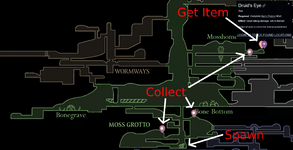
2. Video Guide:
------------------------------------------------------------------------------
THANK YOU to the guy who found the fix:
Here are three ways to get that item:
1. You can use to MapGenie to find the item. Make sure to click "Hide All" then search for Druid's Eye.
2. Picture Guide:
2. Video Guide:
------------------------------------------------------------------------------
THANK YOU to the guy who found the fix:
SOLUTION !!!
Finally, I found a solution. Before entering the room learning L2 skill, you have to equip the blue trinket - Druid's Eye.
View attachment 3649
You can get the trinket by completing a quest from NPC in the picture.
View attachment 3650
After equipping Druid's Eye, when you run out of silk, just keep taking damage, such as jumping into lava many time, until you get enough silk.
This save can get the 100% completion trophy when you finish the game. If finishing the game within 5 hours, you will get 2 speedrun trophies at the same time.
View attachment 3651
To see this hidden content, you must react with one of the following reactions : Like, Love
Like, Love
Looks like the save works in other regions even though its a US save.
--------------------------------------------------------------------------------------------
FIXES FOR SAVES NOT WORKING/SAYING CORRUPTED:
in english
Hi everyone, first, sorry for my bad English.
I finally have this set working!
I've tried many times and all the files say that
What do I do...?
1- I use PlayStation 5, but I play the PS4 version (I use Save Wizard)
2- See which slot the save set will use... save 1 or save 2
3- If you use save 2, you need to start a game in slot 2, if you use save 1, you need to start a game in slot 1
4- Start your save in slot 1 or 2, when the game starts and you can control the Hornet, close the game
5- Copy your save to a flashcard
6- Now delete the save on the PS5/PS4
7- Insert your memory card into the computer and start the Save Wizard
8- Take the file you need from the save set, save over your save
9- Now put the flash card back into your PS5/PS4 and send the save again
I tested 4 files, everything works fine.
guys,put yourself's save "sce_sdmemory" this two files into the godmode.zip,then using 'Re-sign' all files,it will be work.
Maybe the trick is just to delete all your saves both PS4 / PS5 on Playstation 5 before importing the god mode save, i doubt you really need to do all this shit lol, but it works for me so i show you how i do
Actually, to my complete shock, it worked after deleting my saves
For anyone going this route, just make sure to backup your original save to cloud or another usb stick.
Thank you for the save OP.
1. Download the God Mode Save from this page
2. Create a Google Drive Folder with a shareable link and put the restorePoints2 and restorePoints2.bin files in that folder.
3. Use a Discord Bot to resign this folder you created on Google Drive to your PSN ID.
4. Create a PS4 version Game Save on Silk Song specifically in the second slot, play until character is moveable.
5. Close the game entirely and put all of the data on a USB (Make sure there is NO data on the USB until this step) AND delete all game data and saves from the PlayStation.
6. Put USB into your computer and open the CUSA file and delete the restorePoint2 and restorePoints2.bin files AND the sce_sdmemory and sce_sdmemory.bin file
7. You shoud now have only the Save2 and Save2.bin files on your USB CUSA folder.
8. Download and open the resigned folder from Discord and move the restorePoints2 and restorePoints2.bin files to your USB CUSA folder.
9. Open the God Mode Folder and move the Save2 and Save2.bin files over and hit replace files. (I think this part is important, make sure to click overwrite files, DO NOT delete the Save2 files from the USB, just overwrite them by moving the God Mode files over).
10. Put the USB back into the PlayStation, go to Save Game Data and copy to console from USB.
11. Boot up the PS4 version and click Start Game, you should see the God Mode save in Slot 2.
OPTIONAL:
12. If you want to play on the PS5 version, as soon as you see the PS4 Save in Slot 2 of the PS4 game. Fully close the game and boot up the PS5 version. Go to EXTRAS and import save from PS4. You will then have the God Mode Save working on your PS5 Version of the game in Slot 1.
This is what I did in full detail after following what the previous poster said they did to get it work.
Okay guys, I tried several ways to overwrite the save and here’s what worked:
1. Go to any save bot manager on Discord.
2. Select the resign function and add the two files:
restorePoints2
restorePoints2.bin
3. If you haven’t transferred the save to a USB drive yet, do it now.
4. Delete 4 files:
the two you already resigned with save bot (restorePoints2, restorePoints2.bin)
sce_sdmemory
sce_sdmemory.bin
(also delete everything from the console)
5. Upload to the console the files restorePoints2 and restorePoints2.bin that you created with the save bot manager.
6. After that, overwrite the files save2 and save2.bin.
7. Upload all of them to the console together.
The files sce_sdmemory and sce_sdmemory.bin are not needed — delete them from both the console and the USB drive
Also, you don’t need to delete saves from the PS5 version of the game your save slot will not be corrupted with this method and will transfer perfectly into the second slot.
Did some testing myself. I will echo one solution that was mentioned earlier.
When I resigned the save and tried to transfer it to my PS5, the Save Data file showed corrupted and would not work, no matter what I did.
I do still have my PS4 Pro sitting in another room, so I loaded that up and the saves transferred to it with no problem. I uploaded the save to the cloud via my PS4 Pro, then went back to my PS5 to download it from the cloud and it works perfectly.
Last edited: