

• Before registering an account on PlayerSquared you must first agree that you are at least 13 years of age & have read & agree to our Terms & rules & our Privacy policy.
  • To hide your download link, use the following BBCodes:
    You can set specific reactions (like "Thanks," "Love," etc.) that must be selected to unlock the download link. List the reaction numbers like this: 1, 2, 3, etc. 1 = Thanks 2 = Love 3 = Haha 4 = Wow 6 = Canada Thanks

    or you can use:
    Which allows you to charge a certain credit amount in order for someone to get access to the download link.

    The button to unlock the link will appear in the bottom right corner of the post.

US Cyberpunk 2077 "Frequent Flyer" Trophy PS5/PC Save File V2.3 [PPSA03974]

adirka

N00b
September 4, 2024
3
48
52
Save File for "Frequent Flyer" Trophy
Updated for V2.3

File made on base game, No DLC needed.


Load up the save file and just walk up the stairs until you reveal the "Jig-Jig Street" dataterm.

To see this hidden content, you must react with one of the following reactions : Like Like, Love Love
Save Location:
C:\Users\"user"\Saved Games\CD Projekt Red\Cyberpunk 2077
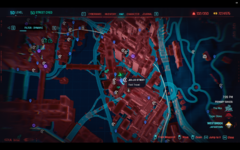
 

Attachments

  • Screenshot 2025-07-30 160546.png
    Screenshot 2025-07-30 160546.png
    3.2 MB · Views: 32
This is actually a brilliant solution, because the issue seems to be that the PS4 copy of the game is not capable of creating V2.3 saves and something seems to go wrong when you bring a frequent flyer save over to PS5.

adirka's save let's you add the save on a PC version of the game which does create V2.3 saves, upload it to cross play then download it back on the PS5 where it should work.
 
Tried this today and I can confirm this works on PS5 despite being a PC save.

-Obtain a copy of Cyberpunk V2.3 for PC
-Move this save to your "C:\Users\"user"\Saved Games\CD Projekt Red\Cyberpunk 2077" folder
-Open the game on PC and log in to enable cross-saves
-Load up the save and re-save it immediately at the bottom of the stairs
-Open PS5 copy, load the save and walk up the stairs, trophy will pop

Thanks again adirka!
 
Tried this today and I can confirm this works on PS5 despite being a PC save.

-Obtain a copy of Cyberpunk V2.3 for PC
-Move this save to your "C:\Users\"user"\Saved Games\CD Projekt Red\Cyberpunk 2077" folder
-Open the game on PC and log in to enable cross-saves
-Load up the save and re-save it immediately at the bottom of the stairs
-Open PS5 copy, load the save and walk up the stairs, trophy will pop

Thanks again adirka!
can you send me the ps4 console save?
 
  • Like
Reactions: IQ07N