• Before registering an account on PlayerSquared you must first agree that you are at least 13 years of age & have read & agree to our Terms & rules & our Privacy policy.
  • To hide your download link, use the following BBCodes:
    You can set specific reactions (like "Thanks," "Love," etc.) that must be selected to unlock the download link. List the reaction numbers like this: 1, 2, 3, etc. 1 = Thanks 2 = Love 3 = Haha 4 = Wow 6 = Canada Thanks

    or you can use:
    Which allows you to charge a certain credit amount in order for someone to get access to the download link.

    The button to unlock the link will appear in the bottom right corner of the post.

Tutorial Final Fantasy IX - Easy Bloodlust Trophy

Benjamin Sisko

Skilled Gamer

August 19, 2022
41
32
499
Final Fantasy IX has some of the most notorious Trophies in the Final Fantasy franchise like "Hail to the King" and "Bloodlust" Which requires you to kill 10,000 Enemies which is a monumental grind that can easily take 20+ hours of normal Gameplay.

Tho there are several methods to get this Trophy by using an automated script and auto battle, or importing a prepared save file. There is actually a very easy way to do it yourself using Save Wizards Advance Mode and editing a specific entry in the Save File.

Unlike most Games that use Raw Hexadecimal Data to save their data, Final Fantasy IX on the PS4 uses a Unity Script Format which makes this task a stroll in the park....

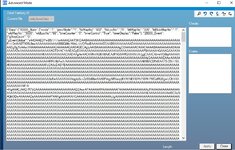
Open your Save File in Advanced Mode and save wizard will open a window that looks like this...

ff9 bloodlust 1.jpg

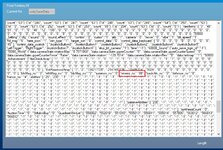
Scroll Down to near the bottom of the data and look for the label "enemy_n0"

ff9 Bloodlust 2.jpg
Change the count to 9999 and hit the Apply Button. Make sure you change only the numbers and don't accidentally remove any of the formatting...

ff9 Bloodlust 3.jpg
Load the game, fight 1 battle and the Trophy Should pop.

Unfortunately I was not able to test this myself as i used an imported save to get the Trophy before I discovered how easy it is to edit the save data so do let me know if it works for you... and Have Fun
 
God I wish every game used this basic ass structure or everything in .json
Nice find
I could not agree more. that enemy_no was just the tip of the iceberg.
I was able to give my party a full set of 100 FAFF Cards with 8 arrows, Max out their stats, Master every ability, magic spell, summom. blue magic without lifting a finger in game.

This save format is a modders dream.
 
  • Like
Reactions: wkedklwnz
I could not agree more. that enemy_no was just the tip of the iceberg.
I was able to give my party a full set of 100 FAFF Cards with 8 arrows, Max out their stats, Master every ability, magic spell, summom. blue magic without lifting a finger in game.

This save format is a modders dream.
Great information in this thread. How were you able to modify the cards? I have been trying and I keep ending up of with multiple of Goblins with either FPFF or OPFF. It seems pretty straight forward but I am obviously missing something. Any guidance would be appreciated.
 
Great information in this thread. How were you able to modify the cards? I have been trying and I keep ending up of with multiple of Goblins with either FPFF or OPFF. It seems pretty straight forward but I am obviously missing something. Any guidance would be appreciated.

The Card data begins immediately following that big Blob of AAAAAAAAAA's with "30000_MiniGame":{"sWin":"90", "sLose":"0", "sDraw":"0", "MiniGameCard.

sWin = how many games you have won. sLose = games lost and sDraw = Games drawn. pretty straight forward. the good stuff follows

The Card data is made up of 100 segments for a maximum of 100 Cards in your inventory. each segment follows this syntax...

{"id":"0", "side":"0", "atk":"250", "type":"3", "pdef":"247", "mdef":"246", "cpoint":"10", "arrow":"255"}

id":"0" - this is the cards id number. it can be a value between 0 and 99 and identifies what card is in that slot
side":"0" - this should always be 0 and indicates the card is a player card
atk":"250" - this is the cards attack power, the first digit in the cards stats. this can be a value between 0 and 255. the higher the value the stronger the card.
type":"3" - this is the cards type, the 2nd digit in the stats. 0 = P Physical. 1 = M Magical 2 = X Flexible and 3 = A Assault
pdef and mdef are the cards defence stats, digits 3 & 4 in the cards stats, agian these can be between 0 and 255
cpoint is the cards point value which determines your card rank. it can be a maximum value of 15.
Arrow":"255" this is a bitmap that determines the cards arrow layout. for a card with all 8 arrows use a value of 255

WARNING - theres a serious overflow bug in the game. when your cards win a card battle against an npc its stats have a chance to grow / increase. if that growth increases the cards stat above 255 it will roll over back to 0. so for atk, pdef, mdef I use a value of 240 this makes the card FAFF and allows room for the card to gain strength without overflowing.. its also a good idea to rotate your cards, ie don't use the same cards every match.

for a complete set of all 100 cards you need to fill in all 100 slots giving each 1 a unique id # between 0 and 99
empty slots in your deck will be filled with 255's for these you need to fill in every parameter.

WARNING the syntax / structure is critical, every quotation mark, every bracket, full stop, colon must be retained. 1 tiny typo, 1 missing quote mark can cause save wizard to throw a PID-0 error and discard all your edits or worse, the save may fail to load in game. take your time and do a few cards at a time and keep backups of your saves
 
  • Like
Reactions: wkedklwnz
Final Fantasy IX has some of the most notorious Trophies in the Final Fantasy franchise like "Hail to the King" and "Bloodlust" Which requires you to kill 10,000 Enemies which is a monumental grind that can easily take 20+ hours of normal Gameplay.

Tho there are several methods to get this Trophy by using an automated script and auto battle, or importing a prepared save file. There is actually a very easy way to do it yourself using Save Wizards Advance Mode and editing a specific entry in the Save File.

Unlike most Games that use Raw Hexadecimal Data to save their data, Final Fantasy IX on the PS4 uses a Unity Script Format which makes this task a stroll in the park....

Open your Save File in Advanced Mode and save wizard will open a window that looks like this...


Scroll Down to near the bottom of the data and look for the label "enemy_n0"
Change the count to 9999 and hit the Apply Button. Make sure you change only the numbers and don't accidentally remove any of the formatting...

Load the game, fight 1 battle and the Trophy Should pop.

Unfortunately I was not able to test this myself as i used an imported save to get the Trophy before I discovered how easy it is to edit the save data so do let me know if it works for you... and Have Fun

You mentioned the Hail to the King trophy, are you able to do the same edits to get that trophy or is it impossible?
 
You mentioned the Hail to the King trophy, are you able to do the same edits to get that trophy or is it impossible?

Unfortunately Not

To trigger the Hail to the King Trophy the game needs to see you complete the 1,000th jump. it's an active / live trigger that unlocks the Trophy when you beat the Mini Game.

The Method I used was to use a pc script and remote play on my laptop, you start remote play on a pc and then run the script and the script plays the game for you. Here is the guide video I used to get the Trophy... Hail to the King Guide

Best of Luck
 
  • Like
Reactions: dapreacher23
Unfortunately Not

To trigger the Hail to the King Trophy the game needs to see you complete the 1,000th jump. it's an active / live trigger that unlocks the Trophy when you beat the Mini Game.

The Method I used was to use a pc script and remote play on my laptop, you start remote play on a pc and then run the script and the script plays the game for you. Here is the guide video I used to get the Trophy... Hail to the King Guide

Best of Luck
The hardest one to get, adjust the latency on the script to make it works is also a pain. But is better than nothing.. XD
 
  • Like
Reactions: Benjamin Sisko