










You can unlock all 24 trophies using this save set.
All saves were made at the last possible checkpoint. Each save requires around 5-10 minutes of progress before the relevant trophy pops.
Saves CAN be re-regioned using the discord save wizard bot. Saves CANNOT be re-regioned using save wizard.
NOTE: Some saves such as Michonne and the final season may give you an error when resigning with save wizard. I am not sure why this is.
How To Fix: Any save unable to resign with save wizard, you must resign using a save wizard discord bot. Sorry for the inconvenience.
The Walking Dead Season One
Hold R1 to walk fast
1. Everything's Going to be Okay
From Main Menu > Season Select > THE WALKING DEAD > Play > Game 1 > Continue Episode 1.
2. It's not stealing if you need it
From Main Menu > Season Select > THE WALKING DEAD > Play > Game 1 > Continue Episode 2.
3. Lend Me Your Ears
From Main Menu > Season Select > THE WALKING DEAD > Play > Game 1 > Continue Episode 3.
4. Penultimate
From Main Menu > Season Select > THE WALKING DEAD > Play > Game 1 > Continue Episode 4.
5. What Remains
From Main Menu > Season Select > THE WALKING DEAD > Play > Game 1 > Continue Episode 5.
6. Loose Ends
From Main Menu > Season Select > THE WALKING DEAD > Play > Game 1 > Continue Special Episode .
The Walking Dead Season Two
Hold R2 to walk fast
1. Split Decision
From Main Menu > Season Select > THE WALKING DEAD: SEASON TWO > Play > Continue Episode 1.
2. Reunion
From Main Menu > Season Select > THE WALKING DEAD: SEASON TWO > Play > Continue Episode 2.
3. Eye of the Storm
From Main Menu > Season Select > THE WALKING DEAD: SEASON TWO > Play > Continue Episode 3.
4. Beyond the Trees
From Main Menu > Season Select > THE WALKING DEAD: SEASON TWO > Play > Continue Episode 4.
5. All The Dead Lie Down
From Main Menu > Season Select > THE WALKING DEAD: SEASON TWO > Play > Continue Episode 5.
The Walking Dead A New Frontier
1. Family Road Trip
From Main Menu > Season Select > A NEW FRONTIER > Episodes > Continue Episode 1.
2. Bloody Business
From Main Menu > Season Select > A NEW FRONTIER > Episodes > Continue Episode 2.
3. Southern Hospitality
From Main Menu > Season Select > A NEW FRONTIER > Episodes > Continue Episode 3.
4. Faces in the Crowd
From Main Menu > Season Select > A NEW FRONTIER > Episodes > Continue Episode 4.
5. Sole Survivors
From Main Menu > Season Select > A NEW FRONTIER > Episodes > Continue Episode 5.
The Walking Dead: Michonne
Hold R2 to walk fast
1. Landfall
From Main Menu > Season Select > MICHONNE > Play > Continue Episode 1.
2. Quiet Time
From Main Menu > Season Select > MICHONNE > Play > Continue Episode 2.
3. Farewell
From Main Menu > Season Select > MICHONNE > Play > Continue Episode 3.
The Walking Dead: The Final Season
Hold R1 or R2 to walk fast
1. Protector
From Main Menu > Season Select > THE FINAL SEASON > Episodes > Continue Episode 1.
2. Defender
From Main Menu > Season Select > THE FINAL SEASON > Episodes > Continue Episode 2.
3. Leader
From Main Menu > Season Select > THE FINAL SEASON > Episodes > Continue Episode 3.
4. Savior
From Main Menu > Season Select > THE FINAL SEASON > Episodes > Continue Episode 4.
Hold R1 to walk fast
1. Everything's Going to be Okay
From Main Menu > Season Select > THE WALKING DEAD > Play > Game 1 > Continue Episode 1.
2. It's not stealing if you need it
From Main Menu > Season Select > THE WALKING DEAD > Play > Game 1 > Continue Episode 2.
3. Lend Me Your Ears
From Main Menu > Season Select > THE WALKING DEAD > Play > Game 1 > Continue Episode 3.
4. Penultimate
From Main Menu > Season Select > THE WALKING DEAD > Play > Game 1 > Continue Episode 4.
5. What Remains
From Main Menu > Season Select > THE WALKING DEAD > Play > Game 1 > Continue Episode 5.
6. Loose Ends
From Main Menu > Season Select > THE WALKING DEAD > Play > Game 1 > Continue Special Episode .
The Walking Dead Season Two
Hold R2 to walk fast
1. Split Decision
From Main Menu > Season Select > THE WALKING DEAD: SEASON TWO > Play > Continue Episode 1.
2. Reunion
From Main Menu > Season Select > THE WALKING DEAD: SEASON TWO > Play > Continue Episode 2.
3. Eye of the Storm
From Main Menu > Season Select > THE WALKING DEAD: SEASON TWO > Play > Continue Episode 3.
4. Beyond the Trees
From Main Menu > Season Select > THE WALKING DEAD: SEASON TWO > Play > Continue Episode 4.
5. All The Dead Lie Down
From Main Menu > Season Select > THE WALKING DEAD: SEASON TWO > Play > Continue Episode 5.
The Walking Dead A New Frontier
1. Family Road Trip
From Main Menu > Season Select > A NEW FRONTIER > Episodes > Continue Episode 1.
2. Bloody Business
From Main Menu > Season Select > A NEW FRONTIER > Episodes > Continue Episode 2.
3. Southern Hospitality
From Main Menu > Season Select > A NEW FRONTIER > Episodes > Continue Episode 3.
4. Faces in the Crowd
From Main Menu > Season Select > A NEW FRONTIER > Episodes > Continue Episode 4.
5. Sole Survivors
From Main Menu > Season Select > A NEW FRONTIER > Episodes > Continue Episode 5.
The Walking Dead: Michonne
Hold R2 to walk fast
1. Landfall
From Main Menu > Season Select > MICHONNE > Play > Continue Episode 1.
2. Quiet Time
From Main Menu > Season Select > MICHONNE > Play > Continue Episode 2.
3. Farewell
From Main Menu > Season Select > MICHONNE > Play > Continue Episode 3.
The Walking Dead: The Final Season
Hold R1 or R2 to walk fast
1. Protector
From Main Menu > Season Select > THE FINAL SEASON > Episodes > Continue Episode 1.
2. Defender
From Main Menu > Season Select > THE FINAL SEASON > Episodes > Continue Episode 2.
3. Leader
From Main Menu > Season Select > THE FINAL SEASON > Episodes > Continue Episode 3.
4. Savior
From Main Menu > Season Select > THE FINAL SEASON > Episodes > Continue Episode 4.
Join the discord server "Xcier" AKA Proto Buffers.

 discord.gg
You have several bots to pick from, each function slightly differently, my favourite is "htos-proto". The below tutorial will use this bot.
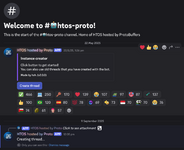
(1) Go to the bot, "htos-proto", and press "create thread" (If it says failed to create thread, it means the bot is offline. Bots go offline occasionally, but typically return after a few hours).
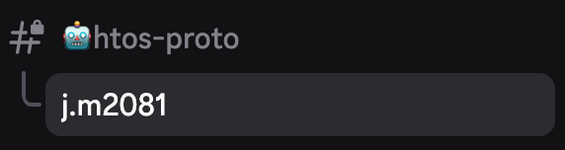
(2) Join the thread, it will be named after your discord username.
(3) Since you want to reregion, type "/reregion", press enter, then press "playstation_id".
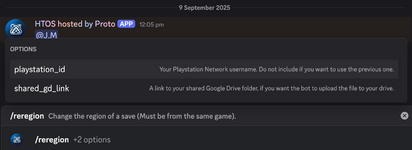
(4) Type in your playstation username, press enter, and the discord server will grab your account id.
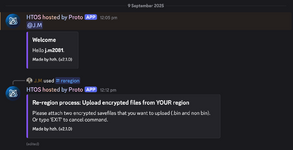
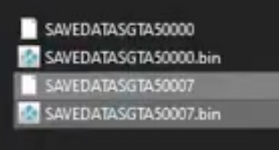
(5) In this case you want to re-region The Walking Dead saves. Upload the save files from YOUR REGION. Each game contains different files within the CUSA folder, they might be named something else, (For The Walking Dead, there are 2 files, named "savedata0" & "savedata0.bin". Upload both of these files) but you want to upload 2 seperate files, the save data and the associated .bin file. In this example screenshot for GTA V, you want to upload either the "SAVEDATASGTA50007" file and the "SAVEDATASGTA50007.bin" or the "SAVEDATASGTA50000" and the "SAVEDATASGTA50000.bin". Don't upload the "SAVEDATASGTA50000" and the "SAVEDATASGTA50007.bin", make sure they are part of the same file.
(6) Once you do this, eventually the discord bot will tell you to upload the save data from the region you want the save from, in this case, my save file. Upload the save data and the .bin file for whatever trophy you want, and give it a couple minutes and the discord bot will give you a google drive link which you can download and upload straight onto your usb, then onto the console.
Discord - Group Chat That’s All Fun & Games
Discord is great for playing games and chilling with friends, or even building a worldwide community. Customize your own space to talk, play, and hang out.
You have several bots to pick from, each function slightly differently, my favourite is "htos-proto". The below tutorial will use this bot.
(1) Go to the bot, "htos-proto", and press "create thread" (If it says failed to create thread, it means the bot is offline. Bots go offline occasionally, but typically return after a few hours).
(2) Join the thread, it will be named after your discord username.
(3) Since you want to reregion, type "/reregion", press enter, then press "playstation_id".
(4) Type in your playstation username, press enter, and the discord server will grab your account id.
(5) In this case you want to re-region The Walking Dead saves. Upload the save files from YOUR REGION. Each game contains different files within the CUSA folder, they might be named something else, (For The Walking Dead, there are 2 files, named "savedata0" & "savedata0.bin". Upload both of these files) but you want to upload 2 seperate files, the save data and the associated .bin file. In this example screenshot for GTA V, you want to upload either the "SAVEDATASGTA50007" file and the "SAVEDATASGTA50007.bin" or the "SAVEDATASGTA50000" and the "SAVEDATASGTA50000.bin". Don't upload the "SAVEDATASGTA50000" and the "SAVEDATASGTA50007.bin", make sure they are part of the same file.
(6) Once you do this, eventually the discord bot will tell you to upload the save data from the region you want the save from, in this case, my save file. Upload the save data and the .bin file for whatever trophy you want, and give it a couple minutes and the discord bot will give you a google drive link which you can download and upload straight onto your usb, then onto the console.
Resigning is just as easy as re-regioning.
To begin, create a thread (Follow steps 1 & 2 from "How to Re-region").
(1) Type "/resign". Press enter, then press "playstation_id".
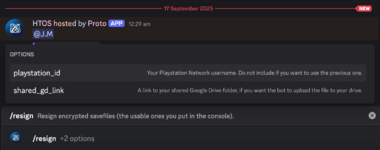
(2) Type in your playstation username, press enter, and the discord server will grab your account id.
(3) After a few seconds, the bot will ask you to upload the files you would like to resign from your account. In this case, upload the "savedata0" and the "savedata0.bin" files from the respective trophy folder you want to resign. To upload a file/files, click the "+" symbol in the bottom left corner of the below image.
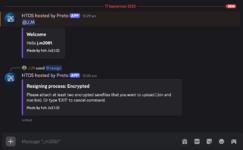
(4) Once uploaded, give the bot a few minutes to resign, then the bot will give you a google drive link which you can download and upload straight onto your usb, then onto the console.
To begin, create a thread (Follow steps 1 & 2 from "How to Re-region").
(1) Type "/resign". Press enter, then press "playstation_id".
(2) Type in your playstation username, press enter, and the discord server will grab your account id.
(3) After a few seconds, the bot will ask you to upload the files you would like to resign from your account. In this case, upload the "savedata0" and the "savedata0.bin" files from the respective trophy folder you want to resign. To upload a file/files, click the "+" symbol in the bottom left corner of the below image.
(4) Once uploaded, give the bot a few minutes to resign, then the bot will give you a google drive link which you can download and upload straight onto your usb, then onto the console.
Last edited:


