






• Before registering an account on PlayerSquared you must first agree that you are at least 13 years of age & have read & agree to our Terms & rules & our Privacy policy.
  • To hide your download link, use the following BBCodes:
    You can set specific reactions (like "Thanks," "Love," etc.) that must be selected to unlock the download link. List the reaction numbers like this: 1, 2, 3, etc. 1 = Thanks 2 = Love 3 = Haha 4 = Wow 6 = Canada Thanks

    or you can use:
    Which allows you to charge a certain credit amount in order for someone to get access to the download link.

    The button to unlock the link will appear in the bottom right corner of the post.

EU The Walking Dead: The Telltale Definitive Edition Full Platinum Saveset [CUSA09457]

DooMZ

Veteran Player
January 2, 2022
200
3,303
14,011
HD-wallpaper-the-walking-dead-the-telltale-definitive-series.jpg

You can unlock all 24 trophies using this save set.

All saves were made at the last possible checkpoint. Each save requires around 5-10 minutes of progress before the relevant trophy pops.

Saves CAN be re-regioned using the discord save wizard bot. Saves CANNOT be re-regioned using save wizard.


NOTE: Some saves such as Michonne and the final season may give you an error when resigning with save wizard. I am not sure why this is.

How To Fix: Any save unable to resign with save wizard, you must resign using a save wizard discord bot. Sorry for the inconvenience.

The Walking Dead Season One

Hold R1 to walk fast

1. Everything's Going to be Okay
From Main Menu > Season Select > THE WALKING DEAD > Play > Game 1 > Continue Episode 1.

2. It's not stealing if you need it
From Main Menu > Season Select > THE WALKING DEAD > Play > Game 1 > Continue Episode 2.

3. Lend Me Your Ears
From Main Menu > Season Select > THE WALKING DEAD > Play > Game 1 > Continue Episode 3.

4. Penultimate
From Main Menu > Season Select > THE WALKING DEAD > Play > Game 1 > Continue Episode 4.

5. What Remains
From Main Menu > Season Select > THE WALKING DEAD > Play > Game 1 > Continue Episode 5.

6. Loose Ends
From Main Menu > Season Select > THE WALKING DEAD > Play > Game 1 > Continue Special Episode .


The Walking Dead Season Two

Hold R2 to walk fast

1. Split Decision
From Main Menu > Season Select > THE WALKING DEAD: SEASON TWO > Play > Continue Episode 1.

2. Reunion
From Main Menu > Season Select > THE WALKING DEAD: SEASON TWO > Play > Continue Episode 2.

3. Eye of the Storm
From Main Menu > Season Select > THE WALKING DEAD: SEASON TWO > Play > Continue Episode 3.

4. Beyond the Trees
From Main Menu > Season Select > THE WALKING DEAD: SEASON TWO > Play > Continue Episode 4.

5. All The Dead Lie Down
From Main Menu > Season Select > THE WALKING DEAD: SEASON TWO > Play > Continue Episode 5.


The Walking Dead A New Frontier

1. Family Road Trip
From Main Menu > Season Select > A NEW FRONTIER > Episodes > Continue Episode 1.

2. Bloody Business
From Main Menu > Season Select > A NEW FRONTIER > Episodes > Continue Episode 2.

3. Southern Hospitality
From Main Menu > Season Select > A NEW FRONTIER > Episodes > Continue Episode 3.

4. Faces in the Crowd
From Main Menu > Season Select > A NEW FRONTIER > Episodes > Continue Episode 4.

5. Sole Survivors
From Main Menu > Season Select > A NEW FRONTIER > Episodes > Continue Episode 5.


The Walking Dead: Michonne

Hold R2 to walk fast

1. Landfall
From Main Menu > Season Select > MICHONNE > Play > Continue Episode 1.

2. Quiet Time
From Main Menu > Season Select > MICHONNE > Play > Continue Episode 2.

3. Farewell
From Main Menu > Season Select > MICHONNE > Play > Continue Episode 3.


The Walking Dead: The Final Season

Hold R1 or R2 to walk fast

1. Protector
From Main Menu > Season Select > THE FINAL SEASON > Episodes > Continue Episode 1.

2. Defender
From Main Menu > Season Select > THE FINAL SEASON > Episodes > Continue Episode 2.

3. Leader
From Main Menu > Season Select > THE FINAL SEASON > Episodes > Continue Episode 3.

4. Savior
From Main Menu > Season Select > THE FINAL SEASON > Episodes > Continue Episode 4.

Join the discord server "Xcier" AKA Proto Buffers.


You have several bots to pick from, each function slightly differently, my favourite is "htos-proto". The below tutorial will use this bot.

(1) Go to the bot, "htos-proto", and press "create thread" (If it says failed to create thread, it means the bot is offline. Bots go offline occasionally, but typically return after a few hours).

1758032908969.png

(2) Join the thread, it will be named after your discord username.

1758032924028.png

(3) Since you want to reregion, type "/reregion", press enter, then press "playstation_id".

1758032938412.png

(4) Type in your playstation username, press enter, and the discord server will grab your account id.

1758032953584.png

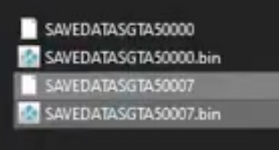
(5) In this case you want to re-region The Walking Dead saves. Upload the save files from YOUR REGION. Each game contains different files within the CUSA folder, they might be named something else, (For The Walking Dead, there are 2 files, named "savedata0" & "savedata0.bin". Upload both of these files) but you want to upload 2 seperate files, the save data and the associated .bin file. In this example screenshot for GTA V, you want to upload either the "SAVEDATASGTA50007" file and the "SAVEDATASGTA50007.bin" or the "SAVEDATASGTA50000" and the "SAVEDATASGTA50000.bin". Don't upload the "SAVEDATASGTA50000" and the "SAVEDATASGTA50007.bin", make sure they are part of the same file.

1758032966952.png

(6) Once you do this, eventually the discord bot will tell you to upload the save data from the region you want the save from, in this case, my save file. Upload the save data and the .bin file for whatever trophy you want, and give it a couple minutes and the discord bot will give you a google drive link which you can download and upload straight onto your usb, then onto the console.

Resigning is just as easy as re-regioning.

To begin, create a thread (Follow steps 1 & 2 from "How to Re-region").

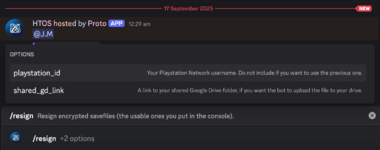
(1) Type "/resign". Press enter, then press "playstation_id".

1758033003816.png

(2) Type in your playstation username, press enter, and the discord server will grab your account id.

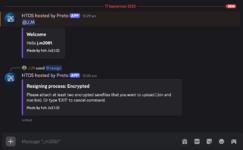
(3) After a few seconds, the bot will ask you to upload the files you would like to resign from your account. In this case, upload the "savedata0" and the "savedata0.bin" files from the respective trophy folder you want to resign. To upload a file/files, click the "+" symbol in the bottom left corner of the below image.

1758033039575.png

(4) Once uploaded, give the bot a few minutes to resign, then the bot will give you a google drive link which you can download and upload straight onto your usb, then onto the console.
 
Last edited:
More than half of the content is issued and needs a fix.
I paid to get access to the files.
1st issue is that Episode 4 of Season 1 starts from the begining. It's a full Episode where i needed 2 months to finish.
2nd and ALOT WORSE than the 1st problem is that every single save file since Season 3 Episode 4 (including) is NOT VALID. Meaning you cant even resign them. Again, that issue includes:
Season 3 - Episode 4 and 5. All episodes of Michonne and all episodes of the Final Season.

I am waiting for a solvation of this big problem. Yes, the problem is in the uploader, not in SaveWizard. I tested many times every single file from every single season and episode many times and in many ways. I'm waiting for the uploader to fix every single problem! And for Christ's sake, test your stuff before uploading, please!
 
More than half of the content is issued and needs a fix.
I paid to get access to the files.
1st issue is that Episode 4 of Season 1 starts from the begining. It's a full Episode where i needed 2 months to finish.
2nd and ALOT WORSE than the 1st problem is that every single save file since Season 3 Episode 4 (including) is NOT VALID. Meaning you cant even resign them. Again, that issue includes:
Season 3 - Episode 4 and 5. All episodes of Michonne and all episodes of the Final Season.

I am waiting for a solvation of this big problem. Yes, the problem is in the uploader, not in SaveWizard. I tested many times every single file from every single season and episode many times and in many ways. I'm waiting for the uploader to fix every single problem! And for Christ's sake, test your stuff before uploading, please!
I will test them and update this post once I have results. I'm not sure why this is happening. I never bothered testing all the saves after the first few episodes, as I uploaded them as soon as I reached the final checkpoints of each episode, and know for sure that they were correct. According to a recent thread on psnprofiles, some people have had issues with not being able to 'continue' after restarting the game, only having the option to start the entire episode again. I really hope there is a fix to this if this is the issue.
 
  • Like
Reactions: pi4agata
I will test them and update this post once I have results. I'm not sure why this is happening. I never bothered testing all the saves after the first few episodes, as I uploaded them as soon as I reached the final checkpoints of each episode.
Thanks for the understanding, bro! I will be waiting for the fix! I can see you are a wise and good person and i'm pretty sure you will fix the issue as soon as possible! looking forward to it! Thanks in advance!
 
  • Like
Reactions: DooMZ
More than half of the content is issued and needs a fix.
I paid to get access to the files.
1st issue is that Episode 4 of Season 1 starts from the begining. It's a full Episode where i needed 2 months to finish.
2nd and ALOT WORSE than the 1st problem is that every single save file since Season 3 Episode 4 (including) is NOT VALID. Meaning you cant even resign them. Again, that issue includes:
Season 3 - Episode 4 and 5. All episodes of Michonne and all episodes of the Final Season.

I am waiting for a solvation of this big problem. Yes, the problem is in the uploader, not in SaveWizard. I tested many times every single file from every single season and episode many times and in many ways. I'm waiting for the uploader to fix every single problem! And for Christ's sake, test your stuff before uploading, please!
Ok I did some testing using the following saves:

The Walking Dead Season One
Episode 4:
Saves work correctly and are able to be resigned. I was also able to continue from the final checkpoint without issue. I tested this save on my main account and an alternate account.

The Walking Dead: The Final Season
Episode 4:
Saves work correctly. I was also able to continue from the final checkpoint without issue. I tested this save on my main account. Note: I did not try resigining this save as the file in the download folder is already resigned to my account, so I just dragged it into my usb and loaded it up.

The Walking Dead: Michonne
Episode 3:
Saves work correctly. I tried resigning this save to my alternate account and got an error on save wizard. Read below.

I'm not sure why when resigning some saves, an error is occurring, my initial guess was because the file is too large (60+mb), but all the files are the same size so that doesn't make sense. I think a fix of this could be to resign using a save wizard discord bot. The bots are great and can resign and re-region any save. The most annoying thing is that these bots aren't online very often so they aren't always available to use. I was going to try test a save using the bot, but at the time of writing they were down. I will test a michonne save once the bot is online.


EDIT: Ok I was able to successfully resign the save and earn the trophy using the save wizard discord bot. I resigned Michonne Episode 1 using the bot. I could not resign this save using save wizard.
 
Last edited:
Ok I did some testing using the following saves:

The Walking Dead Season One
Episode 4:
Saves work correctly and are able to be resigned. I was also able to continue from the final checkpoint without issue. I tested this save on my main account and an alternate account.

The Walking Dead: The Final Season
Episode 4:
Saves work correctly. I was also able to continue from the final checkpoint without issue. I tested this save on my main account. Note: I did not try resigining this save as the file in the download folder is already resigned to my account, so I just dragged it into my usb and loaded it up.

The Walking Dead: Michonne
Episode 3:
Saves work correctly. I tried resigning this save to my alternate account and got an error on save wizard. Read below.

I'm not sure why when resigning some saves, an error is occurring, my initial guess was because the file is too large (60+mb), but all the files are the same size so that doesn't make sense. I think a fix of this could be to resign using a save wizard discord bot. The bots are great and can resign and re-region any save. The most annoying thing is that these bots aren't online very often so they aren't always available to use. I was going to try test a save using the bot, but at the time of writing they were down. I will test a michonne save once the bot is online.


EDIT: Ok I was able to successfully resign the save and earn the trophy using the save wizard discord bot. I resigned Michonne Episode 1 using the bot. I could not resign this save using save wizard.
Cant you resign all of the damaged episode files and reupload them? Theres no way im going to do this and i also have no idea how to use these bots. Deleted the game since i cannot use the damaged files.
 
Hi..
I tried to resign your Files over and over again, but I doesn’t work..
The Discord Bot, says always that he is „thinking“ and nothing happened..
I think I follow your instructions step by step.
Or do I something wrong?
This Discord Bots are new for me…
 
  • Like
Reactions: DooMZ
Hi..
I tried to resign your Files over and over again, but I doesn’t work..
The Discord Bot, says always that he is „thinking“ and nothing happened..
I think I follow your instructions step by step.
Or do I something wrong?
This Discord Bots are new for me…
Hey, sorry for this. The discord bot is sometimes unreliable. If it does that, it means the bot is down. You can try use another bot in the server. With some of the other bots, when you try /resign or /re_region, it will ask you for a few different things, for example "save_files", "account_id" or "game_id".

Here's how to get "save_files":
This is asking for a link to the save file, so instead of uploading the files (like how i explained in the tutorial), you need to provide a link. To get a link of the save file, go to my save set for the walking dead, go to the trophy you want to resign/re-region, then right click on the CUSA folder, press share, then press copy link. You now have the link. If you cannot do this because you are not the owner of the files, you'll need to download it, upload it to google drive, then you'll be able to get the link (as seen in the below video from 00:40).


"account_id" is your account id which you can simply find by writing the command "/my_account_id" into any bot, then writing your PSN name which the bot will then give you your account id.

"game_id" is only if you want to re-region the game. Here you will provide the CUSA code for the region of the game you'd like the save to be re-regioned to.

When "htos-proto" is down, I typically like using either "ezwizard-3" or "dreamer-ez3". For the "dreamer-ez3" bot, you can type in the command "/dm_me_when_online" and you will be notified when the bot is available for use. Please note that for some reason i couldn't resign the walking dead saves using the dreamer bot, it would always give me an error, the ezwizard bot didn't give me this issue, so try using that one if htos-proto isn't working.

I recently got the platinum trophy on another account using all of the saves, so I can confirm that they all function as stated - it's just a bit annoying having to resign with a discord bot because save wizard doesn't like some of the saves.

I hope this clears things up.
 
Hey, sorry for this. The discord bot is sometimes unreliable. If it does that, it means the bot is down. You can try use another bot in the server. With some of the other bots, when you try /resign or /re_region, it will ask you for a few different things, for example "save_files", "account_id" or "game_id".

Here's how to get "save_files":
This is asking for a link to the save file, so instead of uploading the files (like how i explained in the tutorial), you need to provide a link. To get a link of the save file, go to my save set for the walking dead, go to the trophy you want to resign/re-region, then right click on the CUSA folder, press share, then press copy link. You now have the link. If you cannot do this because you are not the owner of the files, you'll need to download it, upload it to google drive, then you'll be able to get the link (as seen in the below video from 00:40).


"account_id" is your account id which you can simply find by writing the command "/my_account_id" into any bot, then writing your PSN name which the bot will then give you your account id.

"game_id" is only if you want to re-region the game. Here you will provide the CUSA code for the region of the game you'd like the save to be re-regioned to.

When "htos-proto" is down, I typically like using either "ezwizard-3" or "dreamer-ez3". For the "dreamer-ez3" bot, you can type in the command "/dm_me_when_online" and you will be notified when the bot is available for use. Please note that for some reason i couldn't resign the walking dead saves using the dreamer bot, it would always give me an error, the ezwizard bot didn't give me this issue, so try using that one if htos-proto isn't working.

I recently got the platinum trophy on another account using all of the saves, so I can confirm that they all function as stated - it's just a bit annoying having to resign with a discord bot because save wizard doesn't like some of the saves.

I hope this clears things up.

Thanks..
With ewizard it works for me…
Your such an Life Saver🤙
 
  • Love
Reactions: DooMZ
View attachment 3353

You can unlock all 24 trophies using this save set.

All saves were made at the last possible checkpoint. Each save requires around 5-10 minutes of progress before the relevant trophy pops.

Saves CAN be re-regioned using the discord save wizard bot. Saves CANNOT be re-regioned using save wizard.

-=Stripped Content=-

NOTE: Some saves such as Michonne and the final season may give you an error when resigning with save wizard. I am not sure why this is.

How To Fix: Any save unable to resign with save wizard, you must resign using a save wizard discord bot. Sorry for the inconvenience.

The Walking Dead Season One

Hold R1 to walk fast

1. Everything's Going to be Okay
From Main Menu > Season Select > THE WALKING DEAD > Play > Game 1 > Continue Episode 1.

2. It's not stealing if you need it
From Main Menu > Season Select > THE WALKING DEAD > Play > Game 1 > Continue Episode 2.

3. Lend Me Your Ears
From Main Menu > Season Select > THE WALKING DEAD > Play > Game 1 > Continue Episode 3.

4. Penultimate
From Main Menu > Season Select > THE WALKING DEAD > Play > Game 1 > Continue Episode 4.

5. What Remains
From Main Menu > Season Select > THE WALKING DEAD > Play > Game 1 > Continue Episode 5.

6. Loose Ends
From Main Menu > Season Select > THE WALKING DEAD > Play > Game 1 > Continue Special Episode .


The Walking Dead Season Two

Hold R2 to walk fast

1. Split Decision
From Main Menu > Season Select > THE WALKING DEAD: SEASON TWO > Play > Continue Episode 1.

2. Reunion
From Main Menu > Season Select > THE WALKING DEAD: SEASON TWO > Play > Continue Episode 2.

3. Eye of the Storm
From Main Menu > Season Select > THE WALKING DEAD: SEASON TWO > Play > Continue Episode 3.

4. Beyond the Trees
From Main Menu > Season Select > THE WALKING DEAD: SEASON TWO > Play > Continue Episode 4.

5. All The Dead Lie Down
From Main Menu > Season Select > THE WALKING DEAD: SEASON TWO > Play > Continue Episode 5.


The Walking Dead A New Frontier

1. Family Road Trip
From Main Menu > Season Select > A NEW FRONTIER > Episodes > Continue Episode 1.

2. Bloody Business
From Main Menu > Season Select > A NEW FRONTIER > Episodes > Continue Episode 2.

3. Southern Hospitality
From Main Menu > Season Select > A NEW FRONTIER > Episodes > Continue Episode 3.

4. Faces in the Crowd
From Main Menu > Season Select > A NEW FRONTIER > Episodes > Continue Episode 4.

5. Sole Survivors
From Main Menu > Season Select > A NEW FRONTIER > Episodes > Continue Episode 5.


The Walking Dead: Michonne

Hold R2 to walk fast

1. Landfall
From Main Menu > Season Select > MICHONNE > Play > Continue Episode 1.

2. Quiet Time
From Main Menu > Season Select > MICHONNE > Play > Continue Episode 2.

3. Farewell
From Main Menu > Season Select > MICHONNE > Play > Continue Episode 3.


The Walking Dead: The Final Season

Hold R1 or R2 to walk fast

1. Protector
From Main Menu > Season Select > THE FINAL SEASON > Episodes > Continue Episode 1.

2. Defender
From Main Menu > Season Select > THE FINAL SEASON > Episodes > Continue Episode 2.

3. Leader
From Main Menu > Season Select > THE FINAL SEASON > Episodes > Continue Episode 3.

4. Savior
From Main Menu > Season Select > THE FINAL SEASON > Episodes > Continue Episode 4.

Join the discord server "Xcier" AKA Proto Buffers.


You have several bots to pick from, each function slightly differently, my favourite is "htos-proto". The below tutorial will use this bot.

(1) Go to the bot, "htos-proto", and press "create thread" (If it says failed to create thread, it means the bot is offline. Bots go offline occasionally, but typically return after a few hours).
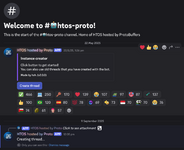
View attachment 3749

(2) Join the thread, it will be named after your discord username.
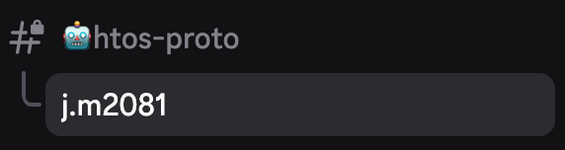
View attachment 3750

(3) Since you want to reregion, type "/reregion", press enter, then press "playstation_id".
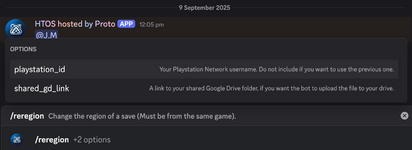
View attachment 3751

(4) Type in your playstation username, press enter, and the discord server will grab your account id.
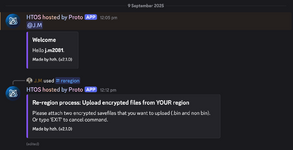
View attachment 3752

(5) In this case you want to re-region The Walking Dead saves. Upload the save files from YOUR REGION. Each game contains different files within the CUSA folder, they might be named something else, (For The Walking Dead, there are 2 files, named "savedata0" & "savedata0.bin". Upload both of these files) but you want to upload 2 seperate files, the save data and the associated .bin file. In this example screenshot for GTA V, you want to upload either the "SAVEDATASGTA50007" file and the "SAVEDATASGTA50007.bin" or the "SAVEDATASGTA50000" and the "SAVEDATASGTA50000.bin". Don't upload the "SAVEDATASGTA50000" and the "SAVEDATASGTA50007.bin", make sure they are part of the same file.
View attachment 3753

(6) Once you do this, eventually the discord bot will tell you to upload the save data from the region you want the save from, in this case, my save file. Upload the save data and the .bin file for whatever trophy you want, and give it a couple minutes and the discord bot will give you a google drive link which you can download and upload straight onto your usb, then onto the console.

Resigning is just as easy as re-regioning.

To begin, create a thread (Follow steps 1 & 2 from "How to Re-region").

(1) Type "/resign". Press enter, then press "playstation_id".
View attachment 3754

(2) Type in your playstation username, press enter, and the discord server will grab your account id.

(3) After a few seconds, the bot will ask you to upload the files you would like to resign from your account. In this case, upload the "savedata0" and the "savedata0.bin" files from the respective trophy folder you want to resign. To upload a file/files, click the "+" symbol in the bottom left corner of the below image.
View attachment 3755

(4) Once uploaded, give the bot a few minutes to resign, then the bot will give you a google drive link which you can download and upload straight onto your usb, then onto the console.
Thanks easy platinum
 
  • Like
Reactions: DooMZ and lenarmo